


The platform works as a learning ecosystem that offers practical and accessible training for coffee producers, technical teams, and coffee-farming organizations. Through content adapted to field conditions, it combines technical knowledge, digital tools, and on-the-ground support to strengthen participants’ capacities. In addition to promoting productivity, coffee quality, and the adoption of good agricultural practices, it also includes training on human rights, the prevention of forced labor and child labor, and fair working conditions.
Sign in
If you are browsing from a mobile phone:
- Tap the three lines in the upper-right corner of your screen. Press “Login”

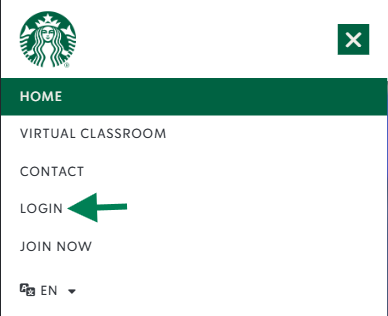
If you are browsing from a computer:
- Click the button in the upper-right corner of your screen.

Enter your email address.
Enter the password sent to your email.
Click “Log in.”
It’s very simple!
- Click on the module.
- This text should appear: “Enrolled.”
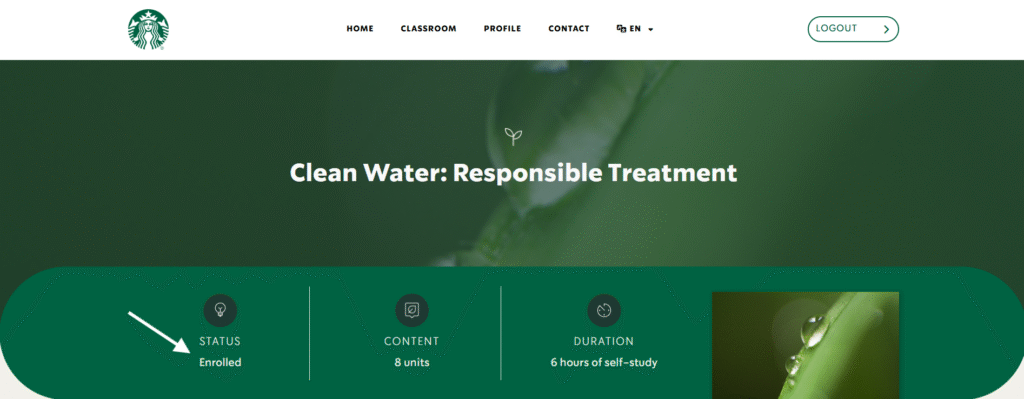
- Start your training!
Log in with your username and password (this information will arrive in your email).
Review the modules available in the classroom.
Click on the image and start your training!
Note: Solidaridad Network is the organization in charge of authorizing access to the virtual courses. If you would like information, fill out this form.
While the module is available, you must:
- Study the academic content.
- Carry out the activities or exercises.
- Pass the assessments.
Done! Download your diploma.
If you forgot your access password, follow these steps:
Go to “Sign in.”
Click “Forgot your password?”
Enter the email address you use to access the course and press send.
You will receive an email with a link. Clicking it will open a page where you can enter your new password.
If you do not receive the message within the next 5 minutes, check the folder in your email called “SPAM.”
– Desktop or laptop computer
– Tablet
– Mobile phone
Compatible web browsers:
Google Chrome (recommended)
Microsoft Edge
Firefox
Safari
For a better interaction experience, a stable web connection and at least 2 GB of RAM on your computer are suggested. For mobile phones, at least 4 GB of RAM is suggested.
To obtain the module certificate you must:
- Have browsed and studied all the academic content.
- Have completed the module activities.
- Pass the final quiz with the indicated passing score.
If you experience any browsing problem on the platform, it may be resolved by clearing your cache history and cookies.
From a computer, follow this procedure:
Open the web browser. Press Ctrl-Shift-Delete at the same time.
You can also visit the following link according to the browser you use:
Important!
After completing this procedure, enter your username and password again. If you forgot your password, see the information mentioned above.